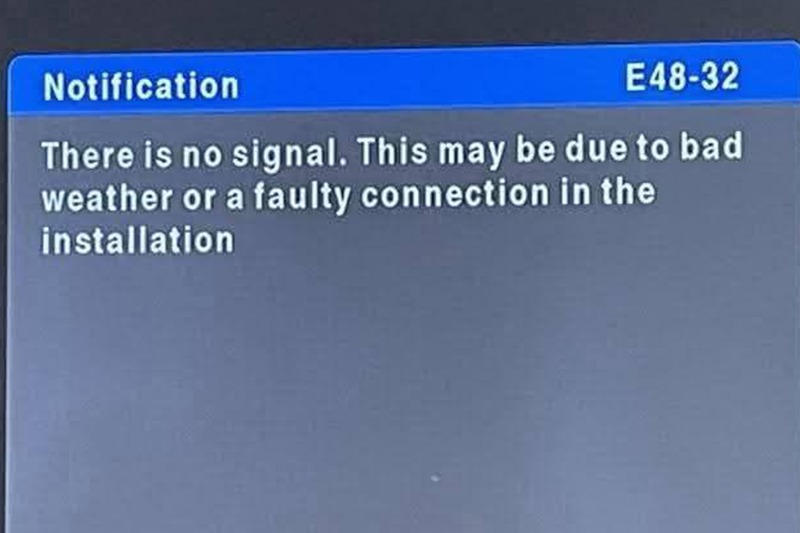
An error code on screen is DStv telling you something quite specific. The problem is that most guides online explain them incorrectly — E48-32 in particular is almost universally described as "no signal", when MultiChoice's own catalogue titles it something else entirely.
Every code below is taken from DStv's official error-code catalogue. Codes that circulate online but are not in that catalogue are listed separately at the end, so you know which is which.
The two most confused codes
| Code | Official meaning | What most sites wrongly say |
|---|---|---|
| E48 | Searching for Signal — the decoder is not receiving an adequate signal from the dish | Often merged with E48-32 |
| E48-32 | Weather — stormy weather and rain | "No signal", generically |
The distinction is genuinely useful. E48-32 during a thunderstorm is normal and will clear on its own — that is rain fade, and no technician can fix the weather. E48 on a clear day is a fault in your dish, LNB, cabling or alignment, and it needs attention.
So the first question to ask is not "what is the code" but "what is the sky doing".
Signal errors
| Code | Official meaning | What to do |
|---|---|---|
| E48 | Searching for Signal | Check dish-to-decoder cabling and connections, then power-cycle at the wall for at least 10 seconds. If it persists on a clear day, you have a dish, LNB or cable fault. |
| E48-32 | Weather | Wait it out. Confirm the weather is actually clear before troubleshooting anything else. |
| E74 / E75 | LNB1 / LNB2 overload | A connection problem between decoders in a multi-room setup. Power off, check the cables are in the correct decoder inputs, power back on. DStv's own guidance is to call an accredited installer if it persists. |
| E73 | TV link overload | Usually a cabling or connection fault on the link between decoders. Same approach as E74/E75. |
| E72 | Rescan in progress | Nothing to do — let it finish. |
Smart card errors
| Code | Official meaning | What to do |
|---|---|---|
| E04 | Please insert smartcard | Power off at the wall, remove the card, wipe it gently with a soft dry cloth, reinsert chip-side down, power back on. |
| E05 | Unknown smartcard | Check you are using the correct card for that decoder. |
| E06 | Smartcard failure | May clear on its own in about 30 seconds. Otherwise same steps as E04; if unresolved, the card and decoder need testing at a DStv service centre. |
| E07 | Checking smartcard | Wait — it is a status message, not a fault. |
| E33-0 / E33-4 | Insert correct smartcard | The card in the decoder is not the one paired to it. |
| E100 / E101 | Smartcard validation failed | Check subscription status first, then use DStv's online fix-error tool. |
| E107 | Smartcard not paired with this device, or the wrong card is inserted | Confirm the correct card, then run the online fix. Allow up to 15 minutes. |
| E120 | Synchronisation in progress | Leave the decoder on and do not power-cycle it. It clears itself in around five minutes. |
Subscription and channel errors
| Code | Official meaning | What to do |
|---|---|---|
| E16 | Service is currently scrambled — either services are suspended, or the channel is not in your package | Check your account balance and package. If both are fine, run DStv's online fix-error. Can take up to 15 minutes to clear. |
| E17 | Channel blocked — no active subscription | Account or payment issue. |
| E19 | Channel inaccessible — decoder inactive or services suspended | Account issue. |
| E30 | Checking the subscription status — not a channel error | Normally clears in about five minutes. If not, run the online fix and allow up to 15 minutes. |
| E32 | Validation in progress | Wait. Do not press buttons on the remote. Use the online fix after five minutes if needed. |
| E600 | Validation in progress | As above. |
| E37 | Invalid channel number | The channel number does not exist. |
| E38 / E39 / E50 | Service not available | Usually a broadcast-side issue, not your equipment. |
| E42 | Parental control lock | Enter your PIN or adjust parental settings. |
| E43 | Channel unavailable in your country | Rights restriction. Nothing to fix. |
| E106 | Decoder identified as not part of the current network | Not self-service. DStv's guidance is to contact a MultiChoice branch or an accredited installer. |
| E109 / E118 | Channel scrambled / cannot be viewed | Package or subscription related. |
Codes you will see quoted that are not in DStv's catalogue
These appear widely online but are not in DStv's published catalogue:
- E32-32 — not in DStv's official catalogue. Plain E32 is (validation in progress). If you are seeing "E32-32", check the digits on screen carefully.
- E141 and E145 — neither appears in DStv's official catalogue, and neither is documented by any reliable source.
- E108 — not in the official catalogue either, despite appearing on many sites.
- E143-4 — "no communication from primary decoder", widely reported for Extra View setups and genuinely common, but it appears in community discussion rather than DStv's formal catalogue. Treat the meaning as reported rather than official. If you are seeing it, it is an Extra View link problem — see Extra View installation.
The three-minute self-check before you call anyone
- Look outside. Rain or heavy cloud plus E48-32 means wait, not call.
- Power-cycle properly. Switch off at the wall, not the remote, for at least 10 seconds. This resolves a surprising share of validation and smart card errors.
- Check the account. E16, E17 and E19 are billing or package problems, and no amount of dish work fixes them.
- Reseat the smart card. Chip-side down, gently wiped, decoder off at the wall while you do it.
- Check the cable at both ends. A loose or corroded F-connector behind the TV is the single most common physical cause we find on callouts.
When it is a job for a technician
Call us when:
- E48 persists on a clear day — that is a genuine no-signal fault, usually alignment, LNB or water in the cable.
- The picture pixelates and recovers repeatedly — a marginal signal that will fail completely in the next storm. See weak signal repairs.
- E74, E75 or E73 keep coming back — DStv's own advice is an accredited installer, because it usually means an LNB or cabling fault in a multi-room setup.
- The decoder will not power on at all — see decoder not switching on.
- E106 — this one is not fixable from your lounge.
One thing worth saying: DStv states that installations may only be done by DStv Accredited Installers. That matters for warranty as much as for quality — a standard accredited installation carries a workmanship warranty and an equipment warranty that unaccredited work does not.
Book a technician or read more about our DStv repair service across Gauteng.